
Playstation 5 Maintenance, Care and How to Avoid Automatic Shutdowns
Playstation 5 Maintenance: Learn how to care for your PlayStation 5 with tips on preventative maintenance, cleaning, proper ventilation, and discover the main causes of automatic console shutdown. Keep your PlayStation 5 properly maintained with these valuable tips.
Por: Buzzo Games
6/20/20254 min read
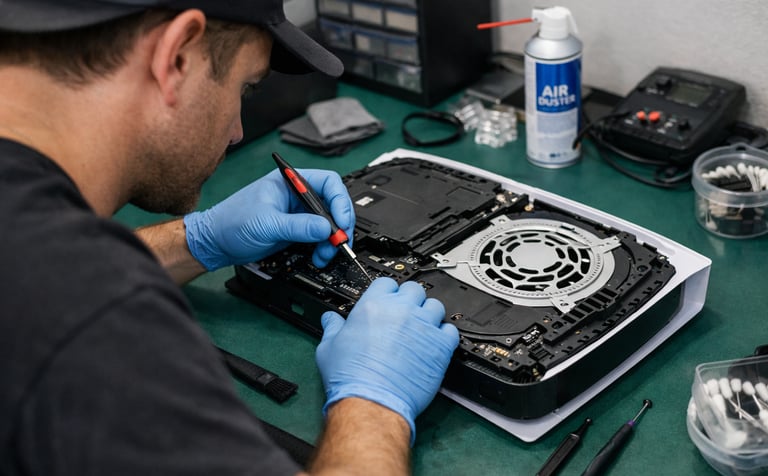
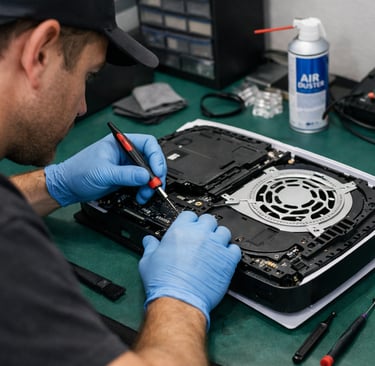
PlayStation 5: Care, Maintenance, and How to Avoid Automatic Shutdowns
The PlayStation 5 (PS5) is one of the most powerful and advanced consoles currently available, but, like any electronic device, it requires specific care and periodic maintenance to ensure optimal performance and avoid problems such as automatic shutdown.
Conclusion
Always keep your PS5 updated, avoid poorly ventilated areas, clean it regularly, and monitor any unusual behavior. Occasional shutdowns may happen from time to time, but if they become frequent, it’s time to investigate more thoroughly.
Your PlayStation 5 is a powerful machine, but like any electronic device, it requires attention, care, and maintenance. By following good usage practices and paying attention to warning signs such as automatic shutdowns or overheating, you can prevent bigger issues and significantly extend the console’s lifespan.
Invest a few minutes in proper care, and you’ll ensure many years of gaming with maximum performance! 🎮
Why Does the PS5 Turn Off by Itself?
Unexpected PS5 shutdowns are a common complaint among some users and can have multiple causes, ranging from simple configuration issues to more serious hardware failures. Below are the most common causes and how to identify them:
🔥 1. Overheating
Description:
When the internal temperature reaches a critical level, the console automatically shuts down to prevent damage to its components.
Common signs:
Console feels hot to the touch
Loud fan noise before shutting down
A message saying “console turned off due to overheating” appears upon restart
Likely causes:
Internal dust buildup
Poor ventilation (console placed in enclosed spaces)
Dried or degraded thermal paste
Solution:
Clean the air vents
Move the console to a well-ventilated area
Seek technical maintenance if the problem persists
⚡ 2. Power Issues
Description:
Power outages, voltage fluctuations, or problems with the console’s internal power supply can cause sudden shutdowns.
Common signs:
Shutdown occurs shortly after turning on or when starting demanding games
Other electronic devices also show instability
Likely causes:
Faulty internal power supply
Poor electrical outlet connection
Lack of a surge protector or voltage stabilizer
Solution:
Use a quality surge protector or UPS
Test another reliable power outlet
Seek technical support to evaluate the internal power supply
💤 3. Misconfigured Rest Mode
Description:
The PS5 automatically enters Rest Mode by default, but bugs in earlier system versions caused issues when resuming.
Common signs:
Console turns off even when not in use
After Rest Mode, the PS5 won’t turn on or enters disk repair
Solution:
Go to Settings > System > Power Saving and disable automatic Rest Mode
Update the system to the latest version
🧠 4. Software or System Errors
Description:
Corrupted data, incomplete updates, or operating system errors may cause the PS5 to shut down as a protection mechanism.
Common signs:
Freezing before shutdown
Repeated restarts when opening the same game or app
Solution:
Start the console in Safe Mode and select “Rebuild Database”
If the issue persists, reinstall the system software via USB drive (option 7 in Safe Mode)
💾 5. SSD or Storage Issues
Description:
Defects in internal or external storage can cause critical failures and automatic shutdowns.
Common signs:
Games freeze and force shutdown
PS5 takes a long time to load or display menus
Solution:
Temporarily remove external SSDs and test
Reinstall problematic games
Use Safe Mode options to repair the system
🎮 6. Game- or App-Specific Errors
Description:
Some games may contain critical bugs that cause shutdowns. This can be local (your PS5) or global (the game itself).
Common signs:
PS5 shuts down only with a specific game
Other games run normally
Solution:
Check for available game updates
Delete and reinstall the game
Report the bug to Sony or the game developer
🧪 7. Hardware Issues (Motherboard, APU, Power Supply)
Description:
Frequent shutdowns even after all previous attempts may indicate internal hardware problems.
Common signs:
PS5 shuts down even after a full reset
Lights blink before shutting down
No visible error messages
Solution:
Take the console to an authorized Sony service center
If still under warranty, request a replacement console
Announcement
Announcement
Essential PS5 Care
To preserve your console and avoid technical issues, follow these recommended practices:
✅ 1. Proper Ventilation
Keep the console in an environment with good air circulation. Avoid closed cabinets, tight corners, and heat-retaining surfaces. Never turn on your console while it is covered or with any type of cover on it.
✅ 2. Regular External Cleaning
Use a dry or slightly damp cloth (preferably anti-static) to clean the console’s casing. Accumulated dust affects ventilation and can cause overheating. Never use abrasive products, alcohol, or cleaning chemicals, as these can damage the console’s casing.
✅ 3. Avoid Prolonged Use Without Breaks
Long gaming sessions should be alternated with rest periods. This helps control the internal temperature.
✅ 4. Electrical Protection
Use a quality surge protector or voltage stabilizer to prevent power spikes from damaging internal components. When turning off the console, disconnect the power and network (internet) cables. This helps prevent damage in the event of lightning strikes affecting the power grid or internet network.
✅ 5. Keep Everything Up to Date
Always keep the system and games updated. Updates fix bugs and improve hardware performance.
Periodic Maintenance: What to Do and When
Although the PS5 is a modern console, it also requires regular technical care:
Internal cleaning recommended every 6–12 months:
Internal cleaning can be done by removing the console’s side covers and, with the help of a blower or vacuum cleaner, carefully removing dust from the fan and internal areas where dust accumulates. For more precise cleaning that requires removing internal components, it is recommended to take the console to a specialized service center.
Fan inspection:
If the fan starts making unusual noises, it may indicate dirt buildup or a defect. Seek technical assistance for maintenance, as the fan is essential to ensure the cooling system works properly.
Thermal paste replacement:
After intensive use over long periods (ideally after 2 years of continuous use), it is recommended to replace the processor’s thermal paste. For this procedure, take your console to a qualified technician.
Use of a cooling stand with fans:
This is a good practice that can help keep temperatures more stable in hot environments.
Click here to learn more about this topic.
Browse our website.
Announcement
Desenvolvedor
Buzzo Games
contato@buzzogames.com.br
© 2024. All rights reserved.